A practical guide to finding podcasts you will actually keep listening to.
Last updated: May 2026
Use topic search, trusted shows, curated links, city and category guides, OPML import, and optional Premium AI to build a podcast library that stays useful over time.
Why Podcast Discovery Matters More Than Ever
The Explosion of Podcast Content
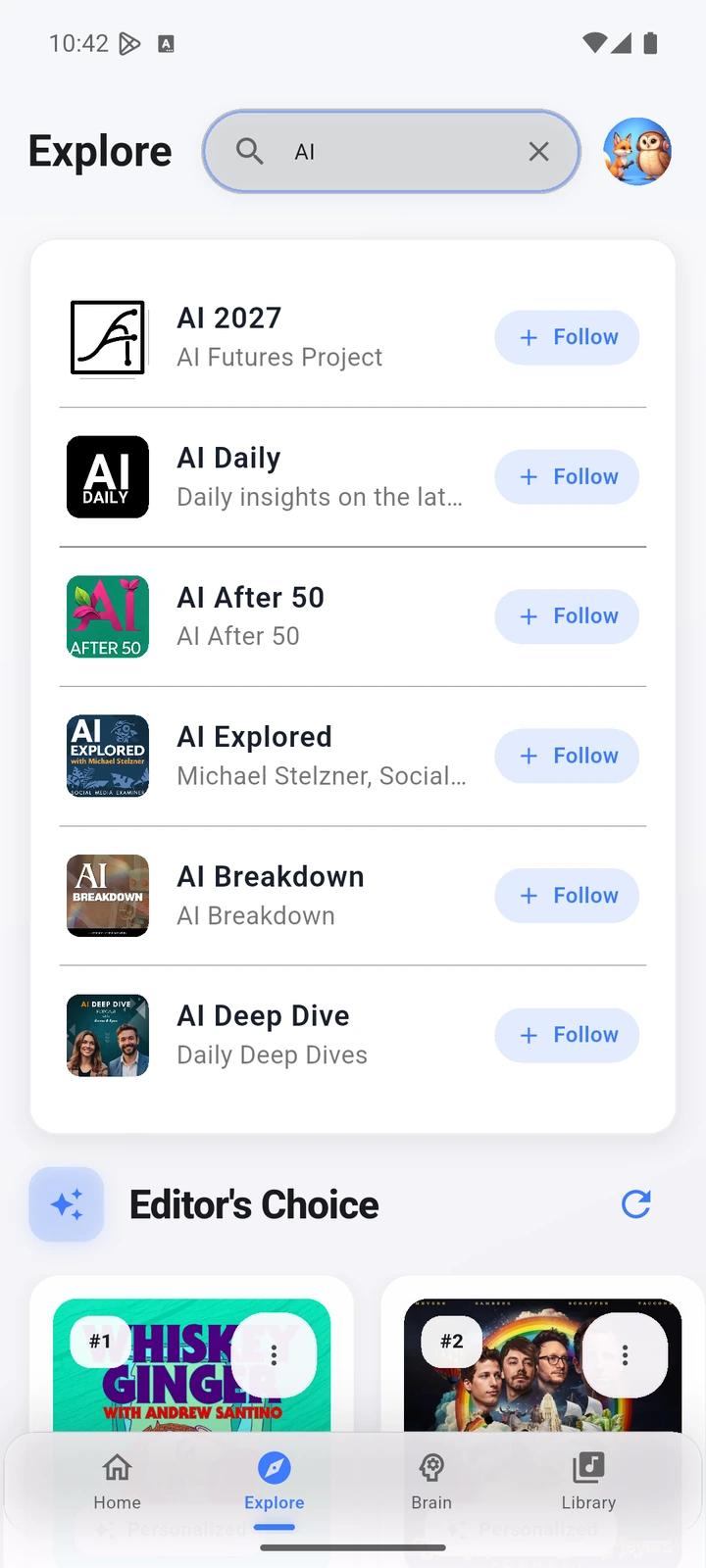
Podcast discovery is hard because the catalog is broad, fragmented, and constantly changing. A useful app should make it easy to search, follow, sample, queue, import subscriptions, and remove shows that no longer earn attention.
Impact on Listener Engagement and Satisfaction
Discovery is useful only when it leads to shows you actually keep. Use search, categories, trusted lists, and your queue to test new shows without pretending every recommendation source is equally strong.
The Role of Discovery in a Competitive Market
Large platforms often promote exclusives, charts, and editorial surfaces. A dedicated podcast app should stay useful for public RSS feeds too: clear search, followed shows, categories, queue control, OPML portability, and topic pages that help listeners choose deliberately.
Topic search and transcript-backed discovery
Use AI only where source data supports it
Podcast discovery should start with visible controls: search, follow, queue, categories, city and topic guides, and OPML import. Optional Premium AI belongs in transcript-backed workflows where source material is available.
Ask better follow-up questions
Voice and assistant behavior depends on the platform. Treat it as an entry point for playback or search when available, then use in-app results, show pages, and saved queues to decide what belongs in your library.
Compare discovery tools by evidence and control
Discovery pages should avoid opaque profiling claims. The Podcast App is strongest when it gives listeners explicit controls, related guides, and source-backed Premium AI for deeper episode review.
Best Podcasts by Genre
Exploring Popular Genres and Their Top Shows
Start with broad genres such as true crime, business, comedy, wellness, technology, and history, then narrow by listening job: quick daily updates, deep interviews, narrative series, study material, or background listening. Topic pages can help turn a broad interest into a manageable shortlist.
Specialized Genres for Niche Interests
For specialized interests, use topic pages as a starting map rather than a final ranking. Pages about ancient civilizations, AI, language learning, cooking, or local shows should explain why the topic matters and link to practical listening workflows.
Genre-Specific Apps and Tools
A discovery-focused app does not need a separate product for every genre. It needs solid search, categories, show following, queue control, OPML import/export, and useful topic guides that send listeners to relevant public podcast feeds.
How to Find Hidden Gem Podcasts
Tapping Into Under-the-Radar Podcasts
Under-the-radar shows are easiest to find by combining independent networks, newsletters, Reddit and Discord communities, podcast directories, guest trails, and topic search. Save promising episodes to a queue, then keep only the shows that earn repeat listening.
Using Reviews and Ratings to Spot Quality
Reviews and ratings can provide useful clues about a show's quality and consistency. Treat them as one signal alongside episode descriptions, publishing cadence, trusted recommendations, and your own listening history.
Following Influencers and Podcast Curators
Podcast reviewers, newsletters, creators, and topic experts often surface useful lesser-known shows. Use those recommendations as leads, then check the show description, recent cadence, episode length, and whether the podcast fits the way you actually listen.
Using Podcast Apps for Discovery
Features to Look for in a Discovery-Focused Podcast App
The right podcast app should combine normal search, followed shows, categories, OPML portability, queue control, and optional Premium AI where transcript evidence is available.
Comparing Popular Podcast Apps’ Discovery Tools
When comparing discovery tools, separate visible product features from marketing language. Look for public feed search, clear show pages, queue control, OPML support, notification controls, transcripts where available, and AI that is tied to source material rather than vague personalization.
Optimizing Notifications and Updates
Notifications can help only when they stay under your control. Follow shows you trust, keep noisy alerts off, and use the queue for episodes that matter now instead of letting every new release compete for attention.
Community-Driven Podcast Recommendations
Leveraging Social Media and Podcast Forums
Communities on Reddit, Facebook, X, Discord, newsletters, and podcast directories can help you find shows through peer recommendations. Use those outside signals with in-app search, follows, and queues to decide what earns a permanent place in your library.
Podcast Clubs and Listening Groups
Podcast clubs and listening groups can introduce shows outside your usual feed. Use a shared topic list, save candidate episodes, and keep discussion notes tied to the original episode so recommendations remain easy to verify.
Influencer and Creator Recommendations
Many podcasters and influencers curate lists of their favorite shows, offering insider perspectives on quality content. Following creators in your favorite niches can expose you to podcasts they trust and enjoy. For example, fans of true crime might follow recommendations linked from the Listen to My Favorite Murder Free page to discover other compelling narratives.
Building Your Perfect Podcast Library
Strategies for Curating Your Collection
Build a useful library by following a small set of reliable shows, saving trial episodes to the queue, and removing subscriptions that no longer fit your current listening goals.
Maintaining Your Library for Relevance and Freshness
Review your subscriptions regularly. If a show keeps piling up unplayed episodes, remove it, export your OPML when you need portability, and keep the active queue focused on what you plan to hear next.
Synchronizing Across Devices and Platforms
Sync matters when you listen on more than one device. After sign-in, check whether subscriptions, queue, and progress follow the way you expect across your iPhone and Android workflows.
Frequently Asked Questions
What is the best way to discover podcasts I will keep listening to?
Use a mix of normal search, followed-show recommendations, trusted lists, city and topic guides, and OPML import if you are switching from another app. Optional Premium AI is most useful when it works from transcript-backed source material.
Can I discover podcasts without using Spotify or Apple Podcasts?
Yes. The Podcast App is a dedicated podcast player for iPhone and Android. You can search public podcast feeds, follow shows, build a queue, and import subscriptions with OPML.
Does AI automatically choose every podcast for me?
No. The safer workflow is listener-controlled discovery: search, follow, queue, compare guides, and use transcript-backed AI only where the app has enough source material.
How do I keep a podcast library organized?
Review subscriptions regularly, remove shows you no longer play, use the queue for current priorities, import or export OPML when switching apps, and use Premium Podcast Brain for deeper review when transcript-backed history is available.
Explore More Guides
Dive deeper into specific topics with our detailed guides and comparisons.
Start with podcast lists built around a specific outcome.
Download The Podcast App
Free podcast player with Premium Podcast Brain, offline downloads, and no app-inserted ads. Available on iOS and Android.
See the actual app workflow.
The screenshots below show current app screens for this workflow.