
Combine several methods rather than relying on one feed. Use an app's personalized recommendations to surface shows near your tastes, browse curated genre lists for depth, and check community sources like Reddit's r/podcasts for peer picks. In The Podcast App you can search by topic, follow shows you like, and let recommendations adapt as your listening history grows, which steadily improves the suggestions you see.
DISCOVERY GUIDE
The Complete Guide to Podcast Discovery in 2026
Last updated: March 2026
Unlock the full potential of podcast listening with the latest strategies and tools for finding new shows tailored to your interests. Whether you are a casual listener or a podcast connoisseur, this guide will help you explore every avenue for discovery in the rapidly evolving audio landscape.
Why Podcast Discovery Matters More Than Ever
The Explosion of Podcast Content
As of 2026, the podcast universe has surpassed 5.5 million active shows globally, a 35% increase from just two years ago. With this vast and ever-growing selection, discovering quality content that fits your interests has become a critical challenge. Podcasts now cover nearly every conceivable topic, from niche hobbies to mainstream news, making effective discovery tools essential to avoid overwhelm and content fatigue.
Impact on Listener Engagement and Satisfaction
Podcast listeners who discover shows aligned with their preferences tend to engage more deeply, with 67% of weekly listeners reporting that personalized recommendations keep them subscribed longer. This engagement drives not only enjoyment but also supports creators through subscriptions, donations, and advertising. Thus, mastering discovery methods directly enhances your listening experience and supports the vibrant podcast ecosystem.
The Role of Discovery in a Competitive Market
With major streaming platforms investing heavily in exclusive content and original productions, competition for listener attention has never been fiercer. Savvy listeners use discovery tools to cut through the noise and find podcasts that offer unique value rather than settling for the most promoted titles. Utilizing apps like The Podcast App that prioritize discovery features puts you ahead in finding fresh and meaningful content beyond the mainstream.
AI-Powered Podcast Discovery
How AI Personalizes Your Podcast Feed
Artificial intelligence now plays a pivotal role in podcast discovery, analyzing your listening habits, preferences, and even episode skip patterns to curate personalized recommendations. AI-driven algorithms can identify subtle interests you may not have consciously expressed, offering shows that expand your horizons while staying relevant. The Podcast App incorporates advanced AI recommendation engines, ensuring your feed evolves dynamically as your tastes change.
Voice-Activated and Conversational Discovery
Voice assistants integrated with AI, such as Siri, Alexa, and Google Assistant, enable conversational podcast discovery. You can ask for podcasts by topic, mood, or even length, receiving instant suggestions tailored to your context. For instance, asking "Find me a mindfulness podcast for beginners" might direct you to the Best Mindfulness Podcasts curated for newcomers, enhancing ease of discovery on the go.
Comparing AI Recommendations Across Platforms
Not all AI recommendation systems are created equal. Some prioritize popular or trending shows, while others focus on deep user profiling for niche suggestions. The Podcast App distinguishes itself by combining AI insights with community feedback and editorial curation, providing a balanced discovery experience. For listeners interested in scientific content, pairing AI features with selections from the Best Podcast App for Science section offers a powerful discovery duo.
Best Podcasts by Genre
Exploring Popular Genres and Their Top Shows
Genres like true crime, business, and comedy continue to dominate podcast charts, but growth in categories like wellness, technology, and history is remarkable. For example, business podcasts have surged by 28% in listener growth since 2024. Discover top titles through curated lists such as Best Business Podcasts 2026 or dive into immersive story-driven podcasts by exploring the Best Podcast App for TV Shows category.
Specialized Genres for Niche Interests
If you have more specialized tastes, the podcast world offers gems in practically every subject. Whether you are fascinated by ancient civilizations or artificial intelligence, curated lists like What Podcast About Ancient Civilizations or What Podcast About AI connect you to expertly selected shows. This targeted discovery saves time and ensures you engage with high-quality content tailored to your unique interests.
Genre-Specific Apps and Tools
Leveraging genre-specific podcast apps can dramatically improve your discovery experience. For instance, if you are a science buff, using the Best Podcast App for Science optimizes your feed with content you are most likely to enjoy. Similarly, those seeking podcasts for daily motivation can benefit from the Best Podcast App for Mindset, each app offering specialized algorithms and curated playlists designed to serve their niche audiences.
How to Find Hidden Gem Podcasts
Tapping Into Under-the-Radar Podcasts
Not all great podcasts receive widespread attention. Many hidden gems fly under the radar due to limited marketing budgets or niche appeal. To find these, start by exploring independent podcast networks, smaller platforms, and emerging creators on social media. The Podcast App’s discovery features include filters for lesser-known shows, making it easier to uncover podcasts that are fresh and unique.
Using Reviews and Ratings to Spot Quality
Listener reviews and ratings provide valuable clues about a podcast’s quality and consistency. Platforms that aggregate and highlight detailed feedback, such as The Podcast App, allow you to identify hidden gems before they go viral. Focus on shows with consistent positive reviews and active community engagement rather than just high download numbers.
Following Influencers and Podcast Curators
Industry influencers, podcast reviewers, and curators often spotlight excellent lesser-known podcasts. Following their recommendations on platforms like Twitter, Reddit, and YouTube can lead you to content not found through automated algorithms. For example, curators who specialize in solo travel podcasts share picks on the Best Podcasts for Solo Travel, ensuring you discover quality shows tailored to your interests.
Using Podcast Apps for Discovery
Features to Look for in a Discovery-Focused Podcast App
The right podcast app can make all the difference in your discovery journey. Key features include personalized recommendations, curated playlists, search filters by genre and mood, and integration with social sharing. The Podcast App stands out by combining AI-powered suggestions with community insights, and by supporting features such as offline listening highlighted in the Best Podcast Player with Offline guide.
Comparing Popular Podcast Apps’ Discovery Tools
Leading apps like The Podcast App, Spotify, and Apple Podcasts each offer unique discovery approaches. Spotify leans heavily on algorithmic playlists, while Apple Podcasts emphasizes editorial curation. The Podcast App excels by offering a balance, plus advanced transcript search capabilities as detailed in the Best Podcast Player with Transcripts review, helping you find shows by topic or even specific phrases.
Optimizing Notifications and Updates
Timely notifications about new episodes or trending shows can enhance discovery, but only if they are well-targeted. The Podcast App’s notification system, reviewed in the Best Podcast App Notifications page, allows customized alerts based on your favorite genres or creators, preventing overload while keeping you informed about relevant content.
Community-Driven Podcast Recommendations
Leveraging Social Media and Podcast Forums
Communities on Reddit, Facebook, and Twitter remain invaluable for discovering podcasts through peer recommendations. Subreddits like r/podcasts and genre-specific groups often share fresh finds and discuss episodes in depth. The Podcast App integrates social features that allow you to share episodes and see what your friends are listening to, bridging the gap between community engagement and app-based discovery.
Podcast Clubs and Listening Groups
Similar to book clubs, podcast clubs encourage group listening and discussion, which can introduce you to shows outside your usual interests. Joining local or virtual podcast clubs can provide personalized recommendations and boost discovery through conversation. For instance, clubs focused on mindfulness podcasts might use the Best Mindfulness Podcasts list as a starting point.
Influencer and Creator Recommendations
Many podcasters and influencers curate lists of their favorite shows, offering insider perspectives on quality content. Following creators in your favorite niches can expose you to podcasts they trust and enjoy. For example, fans of true crime might follow recommendations linked from the Listen to My Favorite Murder Free page to discover other compelling narratives.
Building Your Perfect Podcast Library
Strategies for Curating Your Collection
Building a personalized podcast library requires balancing breadth and focus. Start by subscribing to a core set of favorites across your main interests, then gradually explore new genres or formats. The Podcast App’s playlist and folder features help organize your subscriptions efficiently, allowing easy access whether you want daily news updates or long-form storytelling sessions.
Maintaining Your Library for Relevance and Freshness
Regularly review and prune your subscriptions to avoid clutter and ensure your library reflects your current interests. Use analytics tools within The Podcast App to track listening frequency and episode completion rates, identifying shows you may want to unsubscribe from. This practice keeps your feed fresh and focused on content that truly resonates.
Synchronizing Across Devices and Platforms
In today’s multi-device world, having your podcast library synchronized is crucial. The Podcast App supports seamless cross-platform syncing, so your subscriptions, listening position, and playlists follow you whether on smartphone, tablet, or desktop. This flexibility is especially valuable for commuters, remote workers, and those who enjoy switching between devices throughout the day, as highlighted in the Best Podcast App for Daily Commute and Best Podcast App for Cross Platform guides.
Further reading
Sources and further reading
- Apple PodcastsApple's official podcasts app/platform homepage
- SpotifySpotify homepage (podcasts + music listening)
- Pocket CastsCross-platform podcast player (Automattic)
- Podcast IndexOpen, independent podcast index and API
- Listen NotesPodcast search engine and API
- Edison ResearchLeading US audio/podcast audience research firm
- PodnewsDaily global podcast-industry news of record
- The Podcast Academy (The Ambies)Membership body behind the Ambies awards
- Podcast Health Report — monthly data on how many podcasts go quiet, by genre
Discovery workflow
Find shows by problem, not only by chart rank
Good discovery is a loop: search a specific problem (“salary negotiation”, “sleep apnea myths”), sample two episodes, unsubscribe fast if tone fails, then expand via host networks and guest cross-posts. Charts are a starting map, not a quality score.
On this site, jump from genre hubs like science, business, and fiction. Open catalogs: Podcast Index, Listen Notes. Audience research: Edison Research.
Editorial depth
Discovery that is not an infinite scroll trap
Discovery fails when every surface optimizes for more follows, not more finished episodes. Use a funnel: one seed show you already trust → three “related” or guest-crossover shows → unsubscribe two after a week.
Sources that stay useful: guest graphs on interview shows; publisher networks; open search via Podcast Index; curated genre pages on this site (comedy, true crime, science) rather than random “top 100” dumps. Avoid following five new shows from a single social clip binge.
Open tools: Podcast Index, industry pulse Podnews, audience trends Edison Research.
Related: comedy · science · podcast tools · bring your OPML.
In your language
The Podcast App, running in this language.
These are real screens from the app, not mockups. Every menu, button, and label is translated, so the app looks like this as soon as you install it.
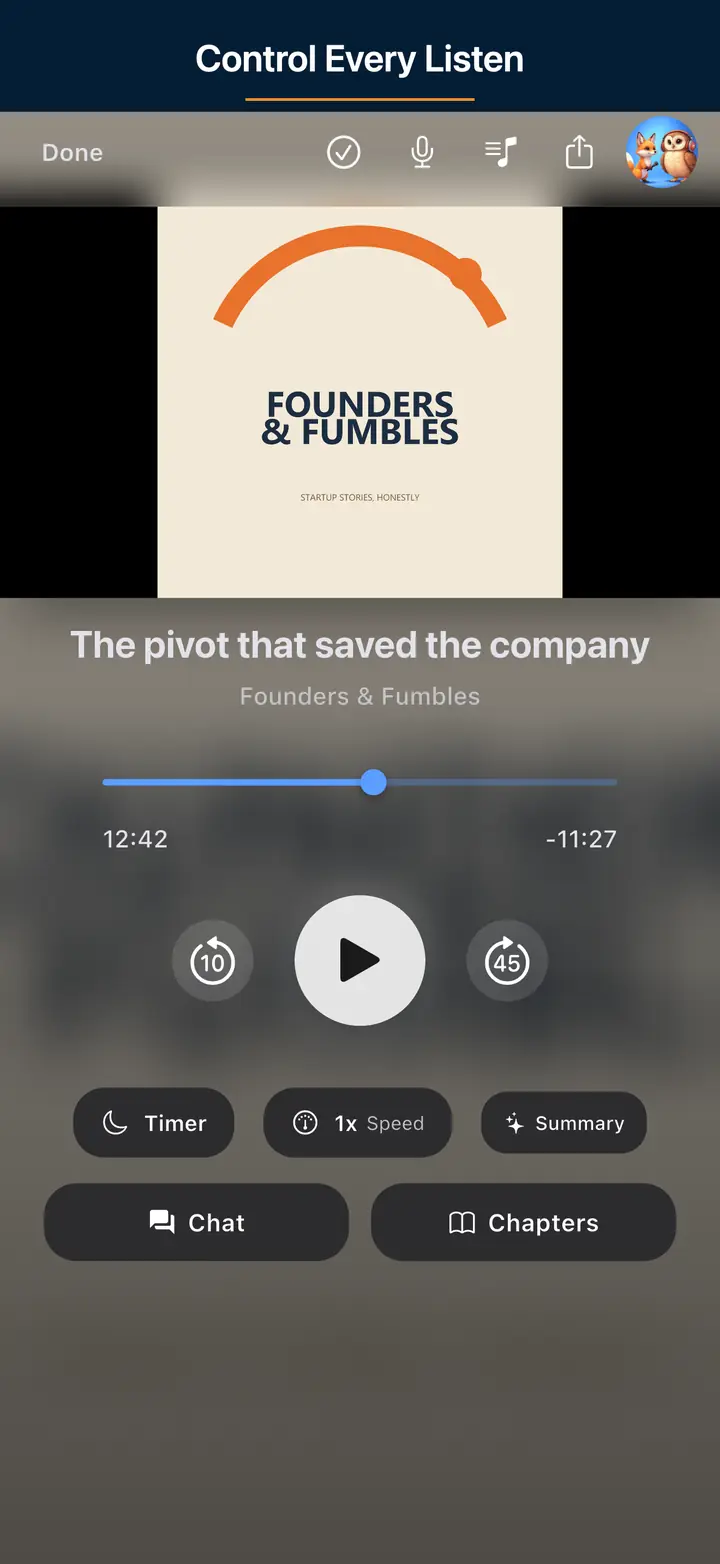
The audio player screen 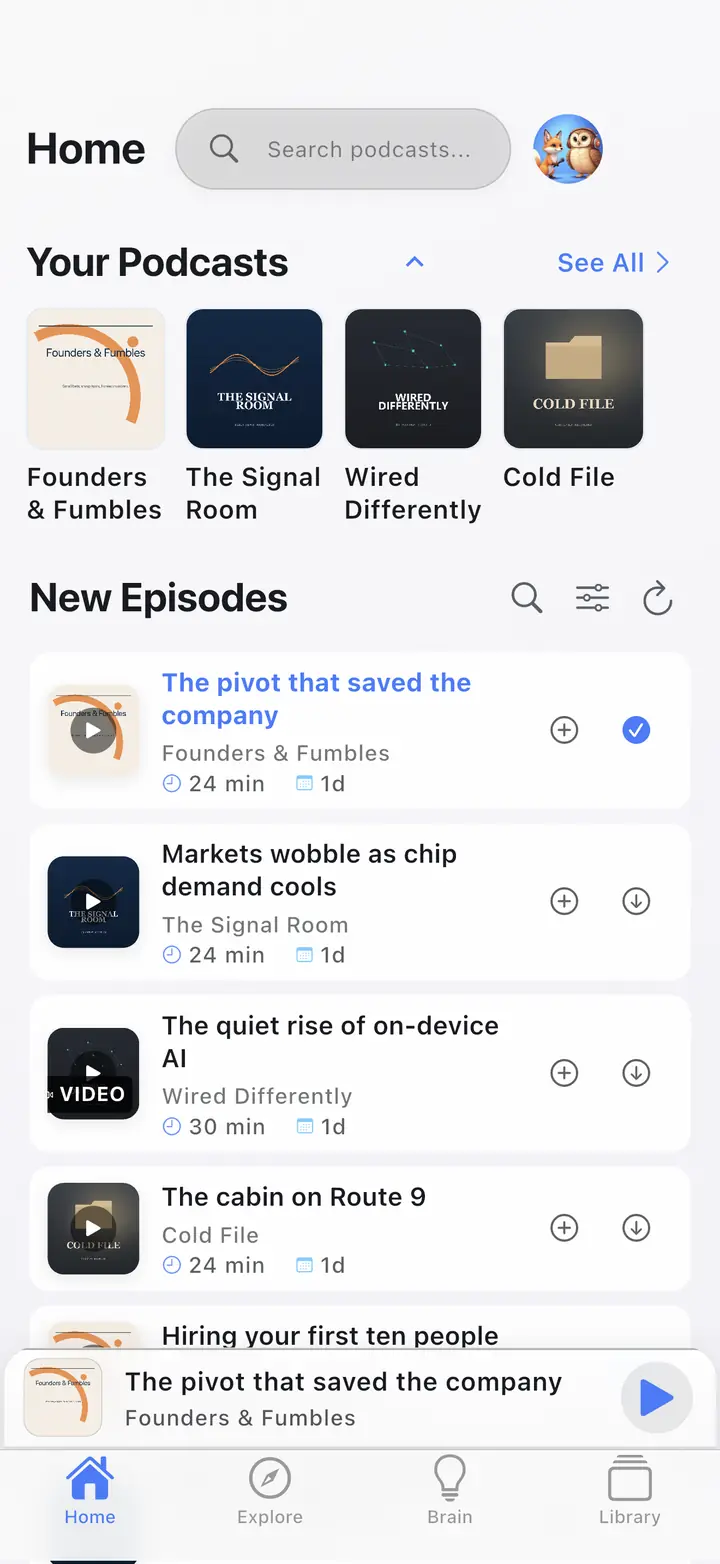
The home screen 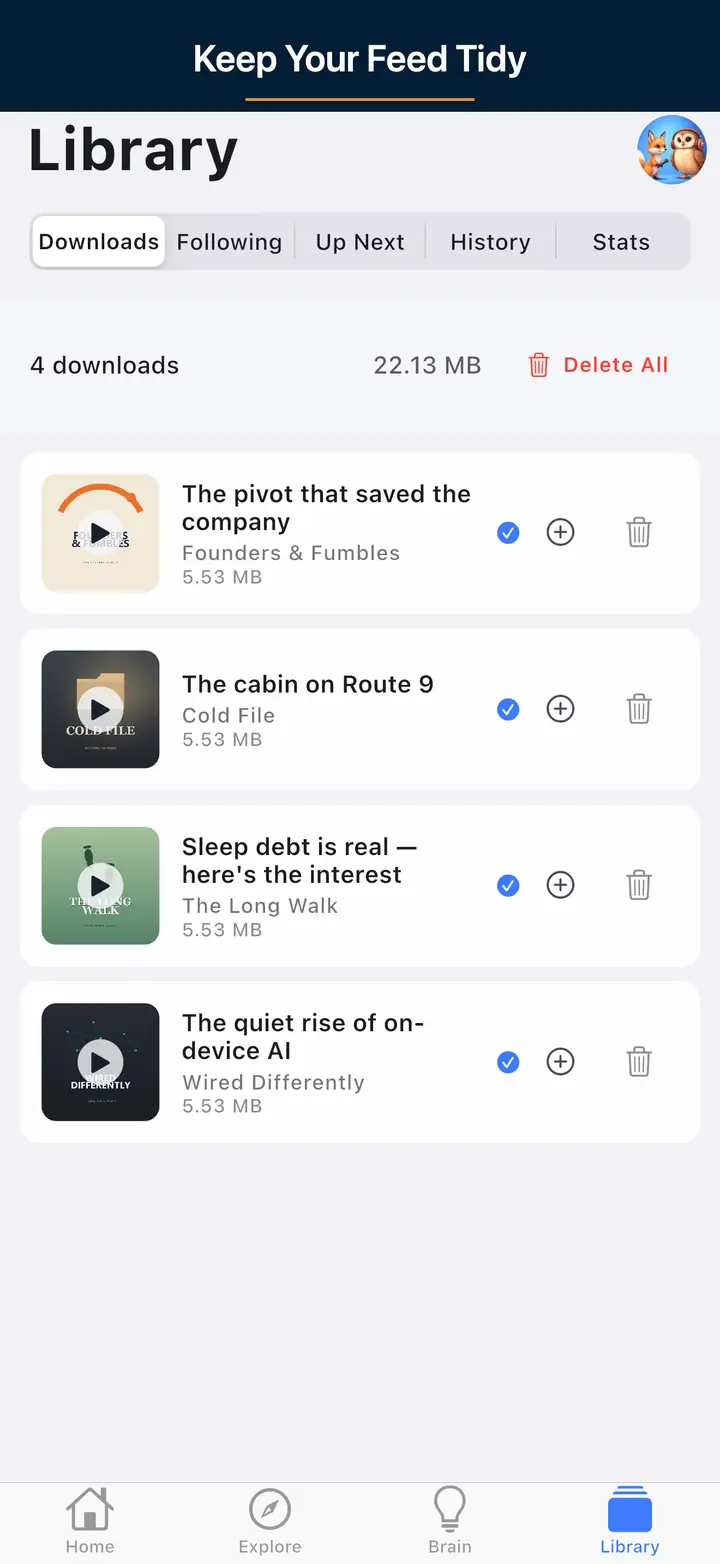
The downloaded episodes screen 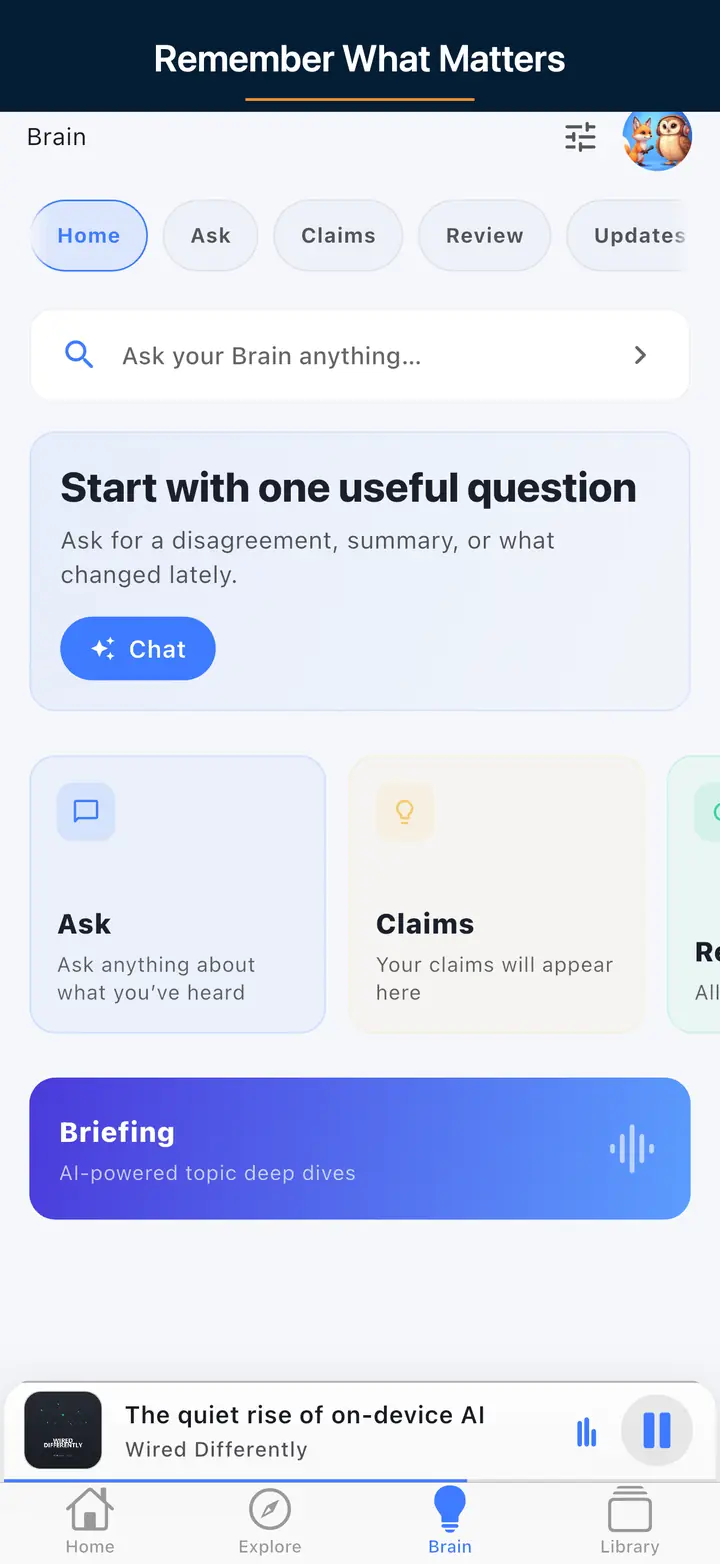
The AI assistant screen
FAQ
Your Questions, Answered
Start with genre and topic searches instead of the general charts, since niche shows rarely rank on popularity alone. Curated lists built around a subject — history, AI, solo travel, mindfulness — point you to vetted picks quickly. The Podcast App's search covers millions of shows, so specific queries like a subgenre or a guest's name often uncover smaller, high-quality podcasts that broad algorithmic feeds tend to overlook.
AI recommendation engines look at what you play, finish, skip, or replay, then suggest shows that match those patterns and gently expand into adjacent topics. Because it learns continuously, the feed shifts as your interests change rather than staying frozen on early choices. The Podcast App blends these signals with curated lists, so suggestions reflect both your behaviour and human editorial judgment instead of raw popularity.
Yes. Independent apps and open directories like Podcast Index and Listen Notes index shows across the whole open podcast ecosystem, not just one platform's catalogue. The Podcast App draws from this open index, so you can search and subscribe to shows regardless of where they're hosted, including smaller independent podcasts that the largest platforms may not promote heavily in their own discovery surfaces.
Review your subscriptions periodically and unsubscribe from shows you no longer finish, so your feed stays relevant. Group subscriptions into playlists or folders by mood or theme — news, deep-dives, wind-down listening — to find the right episode faster. The Podcast App syncs your subscriptions and playback position across devices, so a tidy library stays consistent whether you listen on your phone, tablet, or in the car.
Frequently Asked Questions
What is the best way to discover podcasts tailored to my interests?
Using AI-powered apps like The Podcast App combined with curated lists and community recommendations provides the most personalized and effective discovery experience. Exploring genre-specific apps and leveraging social listening groups also enhance tailored suggestions.
Can I discover podcasts without using large platforms like Spotify or Apple Podcasts?
Yes, independent apps such as The Podcast App offer discovery tools that focus on niche genres and hidden gems, often with less algorithmic bias toward mainstream shows. They also provide features like transcript search and offline listening to improve your experience.
How does AI improve podcast recommendations?
AI analyzes your listening habits, preferences, and contextual data to suggest podcasts that align with your interests and introduce relevant new content. This dynamic personalization adapts as your tastes evolve, providing a continually refined feed.
Are there podcasts specifically recommended for teens or introverts?
Yes, there are specialized collections and apps tailored for different audiences, such as the Best Podcast App for Teens and Best Podcast App for Introverts, which curate content suitable and engaging for these groups.
How can I keep my podcast library organized and up to date?
Regularly review your subscriptions, unsubscribe from shows you no longer listen to, and use playlists or folders to categorize your content. Apps like The Podcast App offer syncing across devices and analytics to track your listening habits, helping maintain a relevant and manageable library.
Explore More Guides
Dive deeper into specific topics with our detailed guides and comparisons.
Goal-Based Lists
Start with podcast lists built around a specific outcome.
Download The Podcast App
Free podcast player with AI Brain, offline downloads, and no app-inserted ads. Available on iOS and Android.