Unlimited offline on free
Download as many episodes as the device will hold. Premium does not unlock offline. Premium does not expand offline. Soft AI caps are an allowance, not a download lock.
Wrong query? If you searched for best Overcast shows 2026, you want episode/show recommendations. This page is an honest Overcast app alternative comparison (iOS craft vs Android parity, OPML, offline, ads). For show discovery, use podcast discovery or our curated genre guides like comedy / true crime — we do not publish a fake “best Overcast shows” farm page.
Overcast is a respected Apple-platform player — Voice Boost, Smart Speed, playlists, and offline downloads on iPhone/iPad/Mac. The shows are still RSS. An alternative is for a different constraint: the same queue on Android, OPML you can export again, unlimited offline downloads on a free player (Premium is Podcast Brain, not a download unlock), and no app-inserted ads. Host-read mid-rolls inside a show still play.
Last updated: September 12, 2026
| Constraint | Overcast | The Podcast App |
|---|---|---|
| Platforms | Apple-first | iOS + Android |
| Catalog | Public RSS | Public RSS + OPML import/export |
| Offline | Downloads on Apple devices | Unlimited offline downloads on free |
| App-inserted ads | — | None (host-read mid-rolls may remain) |
| Premium | Overcast features | Optional Podcast Brain — not a download unlock |
No. Overcast is a podcast player. “Best Overcast shows” searches are about which podcasts to follow — a different job from choosing an app. The Podcast App is an Overcast app alternative when you want Android + iOS, OPML you control, unlimited offline downloads on free, and no app-inserted ads. Premium is Podcast Brain, not a download unlock. We will not invent a ranked Overcast-shows list to chase that query.
| Job | Right page | This page |
|---|---|---|
| Pick an Overcast app alternative | You are here | Honest app compare + OPML switch path |
| Find great shows / episodes | Discovery, comedy, true crime, storytelling | Not a shows ranking |
| Export library from Overcast | Overcast OPML export → import here | Settings → Manage Subscriptions → Import (signed-out OK) |


An app alternative, not a shows list. Here is what we checked on our side and what we left to Overcast’s own documentation.
| What we checked | What we found | Check it yourself |
|---|---|---|
| Intent check | This URL is an app alternative. It is not a “best Overcast shows” list and we did not build one. | There is no ranked shows list on this page. |
| Bringing an Overcast export in | Overcast exports OPML (see Sources). Our importer walks nested outlines, so a grouped export flattens into one subscription list; feeds with invalid or private-network URLs are skipped and reported. | Import; the count matches your feeds. |
| Android parity | One app on iOS and Android with the same queue, downloads and OPML. | Both store listings, same name. |
| What we do not clone | Speed, Skip Silence and a volume-normalising Voice Boost exist in our player settings. We do not claim they match Overcast’s tuned Smart Speed and Voice Boost one-for-one. | Settings → playback; judge the sound yourself. |
| Offline and ads | Unlimited downloads on free (cap code deleted August 22, 2026); no ad SDK since March 9, 2026; host-read ads inside a show still play. | Downloads screen has no counter; you never see a tracking prompt. |
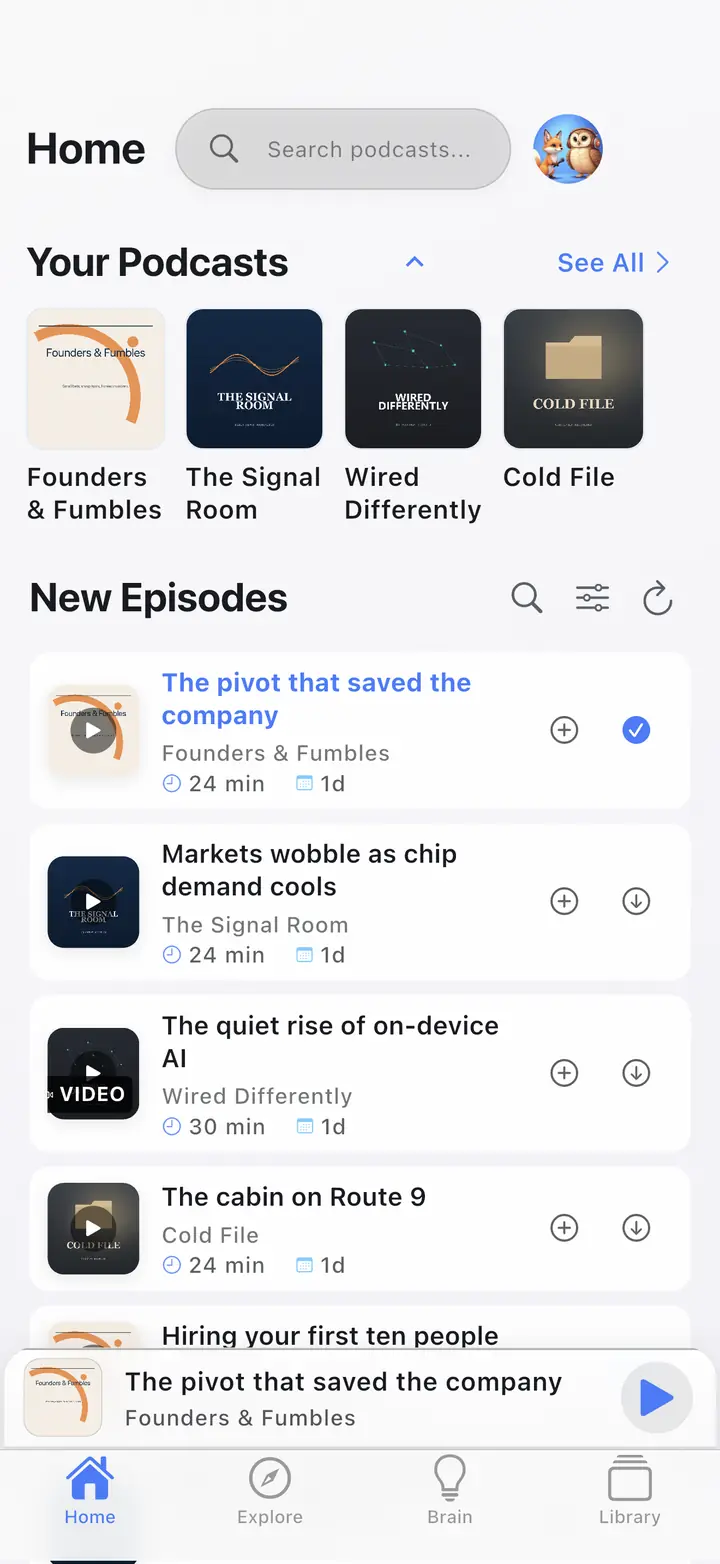
How this page was produced: Written by the operator from the app source and Overcast’s public documentation (linked in Sources), re-read on September 12, 2026. We do not describe Overcast’s menus beyond the vendor’s own words. The screenshot is from our store-listing capture corpus.
Most “Overcast alternative” pages dunk on a respected Apple-platform player. The useful question is narrower: what survives a switch, and what is Overcast-only craft you should expect to rebuild.
Public RSS shows still exist in any client that reads a feed. That is the catalog. Listening habits — speed, boost, playlists — are app-local; you rebuild them in The Podcast App after import.
Overcast Voice Boost and Smart Speed one-for-one. Apple Watch and Overcast-only playlist chrome. Play position, downloads, and Smart Playlists do not ride along in an OPML file. Confirm Overcast’s current export path in Overcast settings — this page does not invent a missing OPML button.
Pixel or Android day. Dual-platform household. OPML they can export again. Unlimited offline downloads on a free player without a second ad layer from the client — banners, feed spots, injected pre-rolls. Host ads in the episode file are a different layer.
You live on a single Apple device, you love Voice Boost and Smart Speed, and you have no Android need. That is a coherent product. An alternative is for a different constraint, not a dunk on Overcast quality.
Do this while the Overcast account still works. Downloads in Overcast stay in Overcast until you pull the same episodes again.
OPML moves subscriptions only. Spec: OPML 2.0.
If a comparison table implies Premium unlocks offline, it is describing a product we do not ship. Score these facts, not a paywall rumor.
Download as many episodes as the device will hold. Premium does not unlock offline. Premium does not expand offline. Soft AI caps are an allowance, not a download lock.
No banners, no feed spots, no player pre-rolls from this client. Publisher audio already in the RSS file still plays. That is not “ad-free.” Details on no app-inserted ads.
Podcast Brain is optional: Ask, Ideas, Recall, Signals, Synthesis Radio on eligible transcript-backed listening. The queue, speed, sleep timer, chapters, and OPML work without it. Premium is Brain, not downloads.
Do not claim Overcast “has no OPML” if product docs show export — check Overcast settings and export while the account still works. Do not dunk on Overcast quality; frame platform parity, exit control, and free-core listening.
We do not invent absolute “ad-free” audio, unlimited free Brain, or a one-for-one clone of Voice Boost / Smart Speed. Host-read mid-rolls inside a show file still play. OPML moves subscriptions only.
If you want the Apple default or Pocket Casts’ power-user tools, use Apple Podcasts alternative, Pocket Casts alternative, compare, or best podcast app 2026. Start at home if you want the product, not the switch.
Every Overcast claim on this page is limited to what the vendor publishes. Re-opened September 12, 2026.
No — it is a different client for the same open RSS catalog. Keep Overcast if you live on Apple devices and want Voice Boost, Smart Speed, and Overcast playlists. Switch if you need iOS and Android parity, OPML you control, unlimited offline downloads on free, and a player that does not insert its own ads. Host-read mid-rolls inside a show file still play.
Yes. Sign in at overcast.fm/account and use Export Your Data while the account still works (older guides describe an in-app Settings → Export OPML entry; use the account page if your build does not show it). Then import in The Podcast App via Settings → Manage Subscriptions → Import Subscriptions. OPML moves public RSS subscriptions, not play position, downloads, queue, or Smart Playlists. Full steps on /switch.
Yes. Unlimited offline downloads are free. Premium is optional Podcast Brain / AI, not a download unlock. Soft AI caps are not an offline metric. Device storage and what you queued are the remaining bounds.
No. Premium does not unlock or expand offline. Offline stays on the free player. Premium is Podcast Brain — Ask, Ideas, Recall, Signals, and Synthesis Radio on eligible transcript-backed listening.
The Podcast App does not insert banner, feed, or player ads. Host-read mid-rolls already in the episode file may still play. That is not ad-free audio. Overcast’s own free visual-ad model is Overcast’s product — this page does not invent it.
Those Overcast playback tools do not transfer with OPML. After import, re-tune speed and EQ in The Podcast App for a week. Re-download offline files before you leave Wi-Fi. Playlists and listen history stay behind unless you rebuild them.
Free core listening in The Podcast App. Unlimited offline downloads. No app-inserted ads. Brain stays optional.
The switch guide and the other app-alternative comparisons.